Binary File Splitter
This little software may be of no or
limited use to most people.
I have a large selection of EPROM images saved.
The files are saved in ELAN EPROM burner specific format so in order to be used
on other burners the files have to be converted to bin-format. The old DOS
Exfile software by ELAN has a function to do that so it is
no problem on
files containing only one EPROM image. However, the ELAN burner could save a
batch of up to 8 EPROM's of the
same type in one single file. So if the
intented burner does not support batch files, which probably is the most common,
large batch files
must be divided into individual files and that's what this
program does.
June 25, 2024 - New version 1.0.1
Changes
from 1.0.0 to 1.0.1:
Bugfux:
Typo
in Device Type frame.Third one down was 24256, is now 27256.
Changes:
Caption on Main Form changed
to Binary File Splitter ...
Caption on Select button changed to Browse
for Source File
New:
When a
source file has been selected a suggested file name is now added in the Target
File text box.
Version 1.0
Initial version.
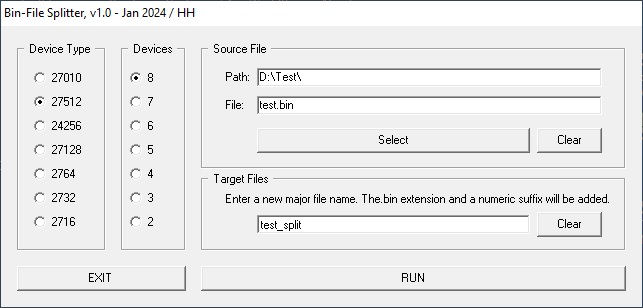
Here's a screen shot:
Select the type of the
devices (= size) in the source file.
Select the number of devices in the source file.
Select the source file.
Enter the name of the target file. A sequential
number will be added to the end of the name of each file. These files will be saved in the same folder
as the source file.
Click RUN. If the source file size match the selected
device and number of devices it's done. If not en error message will be shown.
In Exfile the CRC of each device is known so it is a good idea to check each
file in the new burner before the device is burned.
Download Binary File Splitter here
Email me with comments /Håkan